Keep Practising on Your Desktop Once the Course Completes
One handy aspect of DaDesktop is that learners can carry on using their course setup to practice after the training wraps up. Before the course ends, each participant receives an email asking if they'd like to keep access to that desktop machine.
Normally, the course desktop is taken down a little while after the course finishes. If you'd rather hang onto it for more lab practice, you can clone it into a 'Standalone Desktop' and use the machine later.
Head to your Course, find your desktop machine, and click the 'Use desktop after course' option beside it.
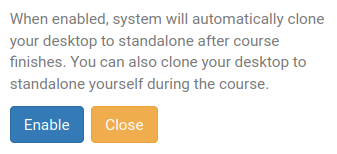
DaDesktop then walks you through the straightforward steps and gives you the opportunity to 'Enable' this feature.
Once it's enabled, you'll see the following shown next to your course machine

After the course, to get to your Standalone machine, just click the Standalones menu at the top of the screen.
Any machines left idle for a month will be removed, but you'll get an advance email notice, giving you plenty of time to keep them active if you'd like.
Check out this page for more on managing the retention of your Standalone machine.